
WITH CRONUS



1000’s OF FREE SCRIPTS
GPC SCRIPT LIBRARY
Instantly connect to the Cronus Community’s exclusive GPC Script Library – the largest collection of free game scripts in the world. Get one-click access to thousands of powerful, ready-to-use scripts for the latest titles. Search, filter, and favorite your go-to MACROS, or connect directly with script creators for custom help and updates.

BUILD YOUR OWN MACROS
SCRIPT COMPILER
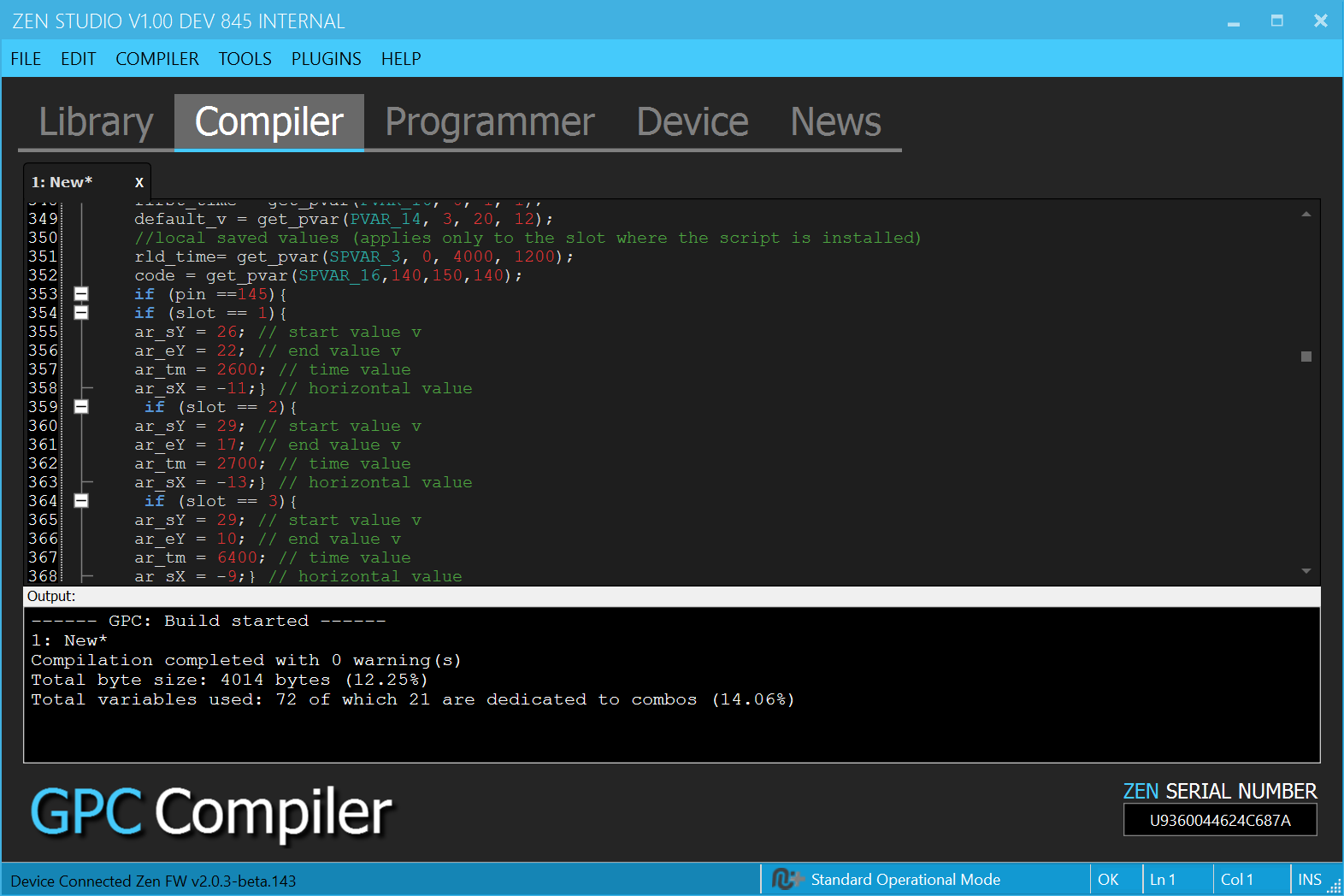
Zen Studio gives you everything you need to build your own macros. Use the built-in GPC script editor, compiler, and real-time debugger to test and perfect your scripts. Then share them with the Cronus Community by uploading directly to the GPC Library.
DRAG AND DROP
EXPERT GAMEPACKS
Our expert developers deliver pre-configured GamePacks for today’s biggest titles. Just drag and drop to your Zen, pick your macros using a simple setup menu, and fine-tune them in real time with Zen’s built-in OLED screen.
Each GamePack comes loaded with powerful macros like rapid fire, aim assist, and anti-recoil. For serious players, BEAM GamePacks unlock next-level features – including the legendary Silent Aim, an ultra-precise anti-recoil and aim assist system available only on Cronus Zen.

EASY SETUP
MOUSE & KEYBOARD
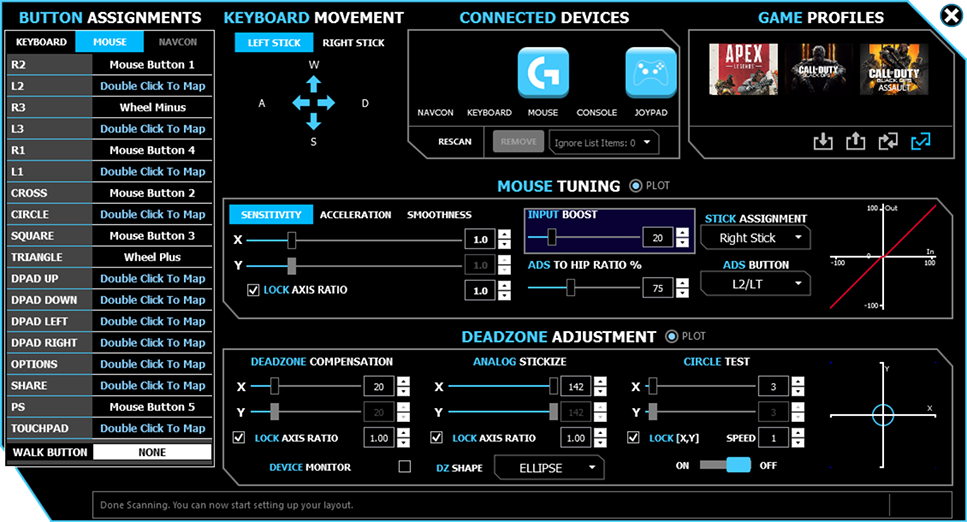
Get the edge in FPS games with ultra-responsive mouse and keyboard support – no lag, no restrictions. Cronus Zen lets you play with PC-level precision on console by converting mouse input to 1:1 controller movement. No segmented lobbies, no detection – just smooth, accurate aim.
Mix and match your gear any way you want. Use a mouse for aiming, analog sticks for movement, or even map custom scripts to every key on a keypad. However you play, Zen gives you total control.
FREQUENTLY ASKED QUESTIONS
This is a selection of the most popular questions we get. We’ll be sure to add more as soon as you guys throw them our way!
WHAT'S THE DIFFERENCE BETWEEN ZEN & CRONUSMAX?
Zen has been in development for over three years, so it’s safe to say that there are a huge number of differences in features and capabilities.
Check out this page for a detailed comparison chart.
WHAT CONSOLES OR SYSTEMS DOES ZEN WORK WITH?
Cronus Zen is compatible with all models of PlayStation 5*, Xbox Series X|S, PlayStation 4, Xbox One and Nintendo Switch. Zen also connects to Windows PC with full Xbox emulation. Legacy support is also given to Xbox 360 and PlayStation 3 consoles, including many Android devices (requires OTG cable).
*PlayStation 5 games require two different types of boot method, depending on the game – PS4 SPECIALITY or PS REMOTE PLAY. If the game boots with the PS4 SPECIALITY method, then it requires a third-party licensed PS4 controller. We4 recommend the HORI PS4 Mini-Pad.
You can check the Zen User Guide for more detailed PS5 information.
ARE THE LATEST CONTROLLERS SUPPORTED?
Absolutely! We’ve worked hard to make sure as many of the newest and most popular controllers are supported, and will continue to do so as more are released to the market. We’ve concentrated on the most popular licensed brands such as Razer, Scuf, Nacon, Astro and of course the new Xbox Elite Series 2 – which has both USB and Wireless Adapter Support.
CAN I GET BANNED FROM XBOX LIVE OR PSN?
Using third-party devices with any online service is always a risk so there are no guarantees. Unlikely as that may be, it is always possible that you can be banned or blocked at any time without notice or warning.
However, Cronus connects to your console using an original, licensed controller, so the console always believes that you are gaming with a controller meant for the console you are playing on (example you can use an Xbox Elite S2 controller on a PS4, or a mouse and keyboard on an Xbox Series X).
Cronus simply mimics button, stick and trigger presses/movements using scripts or ‘macros’ that allows you to connect and compatible controller to any supported console. Cronus does not “hack” anything in the game or console, nor does it allow you to do anything that the game itself does not allow (such as AimBot and walking through walls – it is impossible for Cronus to do any of these hacks).
IS THERE ANY LAG?
The processing power of the Zen is exponentially more powerful than that of its predecessor, the CronusMAX PLUS, and features a new data transport engine that is currently featured in another device we provide to every professional team in the Call of Duty League and World Championships. We have worked closely with some of the best eSports players in the world to make sure that this hardware is as seamless as if you were connected directly to the console.
HOW EASY IS IT TO SETUP MOUSE & KEYBOARD?
We set out to make a Mouse & Keyboard to Console experience that was on par with the best. There’s a brand new M&K software interface that will change the way you game. The setup is very intuitive and includes presets for the most popular games, with more being added regularly. Most brands of Mouse and Keyboard are auto-detected – all you need to do is set the polling rate and dpi, connect to the Zen, select your game profile and go. That’s it!
Note: Check out this page for the latest M&K game profiles and best settings.
HOW MANY CONTROLLERS CAN I USE?
You can use as many controllers as the console allows, however you can use one controller per Cronus Zen at any one time.
Zen takes on the “identity” of a controller and converts its signals digitally to the controller you wish to use. For example, if you have an Xbox One, the Cronus Zen will take on the identity of your Xbox One controller through the process of “Authentication”. The Security ID of that Xbox One controller is then stored inside the Cronus Zen so that the Xbox One thinks that the Zen is in fact the Xbox One Controller. You can then connect any controller you wish to the Zen and it will convert the controller’s signals to the console in real-time. This allows you to use almost any controller on any console.
If you wish to use more controllers for crossover or modding on the same console, you would need a Zen for each controller.
Note: For correct “Authentication”, Cronus Zen requires a wired original licensed controller. You can find more information about Authentication, why it’s needed and how it works in the Zen User Guide.
DO I HAVE TO DOWNLOAD ANY SOFTWARE?
Yes, the software at the heart of Cronus Zen is Zen Studio for Windows.
WHAT GAMES DOES ZEN WORK WITH?
Note: See Zen User Guide for more details.
ARE WIRELESS CONTROLLERS SUPPORTED?
Yes! Cronus Zen supports Bluetooth for PlayStation and, Nintendo Switch Joy-Cons, Switch Pro, WiiMote and WiiU Pro wireless controllers.
Xbox Series X/S and Xbox One controllers do noy support Bluetooth, but they do support the Xbox Wireless Adapter (sold separately).
Are headsets and in-game chat supported?
Yes! Both Xbox One and PS4 wired & wireless headsets are supported, and they can connect direct to your controller. We have even added support for CROSSOVER AUDIO so you can use your Xbox One Headset, connected to an Xbox One controller, connected to a PlayStation 4 with no lag, which makes Cronus Zen the first device in the world to offer this unique feature.
Note: See User Guide on how to setup Headsets with different controllers and consoles.
Is a bluetooth adapter or add-on required?
All Bluetooth features are built straight into the device to give you a completely seamless and cost-effective experience. There are no expensive hidden extras. We do recommend that anyone with an Xbox One controller use the Microsoft Xbox Wireless Adapter for optimal wireless performance as it supports more features than Bluetooth.
Are GamePacks Free?
Yes! Cronus is a community-based product, designed by modders for modders. The GPC Library and the thriving Cronus Community exist because of the input from the scripting and modding scene that has grown around Cronus and the GPC language. GamePacks and the GPC Library will always be free at Cronus.
In addition, the Cronus Marketplace offers both free and paid scripts, with premium options created by handpicked community members to support their work.
DOES THE CRONUS ZEN HAVE A WARRANTY?
YES, Absolutely.
Cronus warrants its product to be free from defects in materials and workmanship under normal use for a period of 90 days from the date of purchase, as evidenced by the purchase receipt. During the warranty period, Cronus will repair or replace the product if defective. This warranty is limited to the original purchaser and is non-transferable.
WILL ZEN STUDIO WORK ON A MAC?
Zen Studio is Windows-only software, however, you can run Windows on a MAC using the free BootCamp tool. Cronus Zen has been successfully tested on a MAC with this setup.
Where can I buy Cronus Zen?
You can buy direct from our official store https://shop.cronusmax.com